Credits and billing
AgentMySite measures usage in credits. Your plan gives you a number of credits each month, shared by all the sites in your account.
What uses a credit
Section titled “What uses a credit”| Activity | Credits |
|---|---|
| An AI reply delivered to a visitor | 1 |
| A reply saying the assistant can’t answer the question | 1 |
| Each action the assistant takes, such as looking up an order (AgentActions) | 1 per action |
For example, a question answered from your help docs uses 1 credit. A question where the assistant looks up an order and then replies uses 2 credits: 1 for the action and 1 for the reply.
These don’t use credits:
- Opening the widget
- Loading chat history
- Searching your content
- Errors where no reply reached the visitor
- The live preview on the Appearance page
When credits reset
Section titled “When credits reset”Credits reset every month, on all plans, including annual plans. You can’t carry unused credits into the next month.
Your reset date depends on your account. On the Free plan, it’s the day of the month you signed up. On a paid plan, it’s the day of the month your paid period started. In shorter months, the reset falls on the last day of the month. The dashboard shows the exact date.
Check your usage
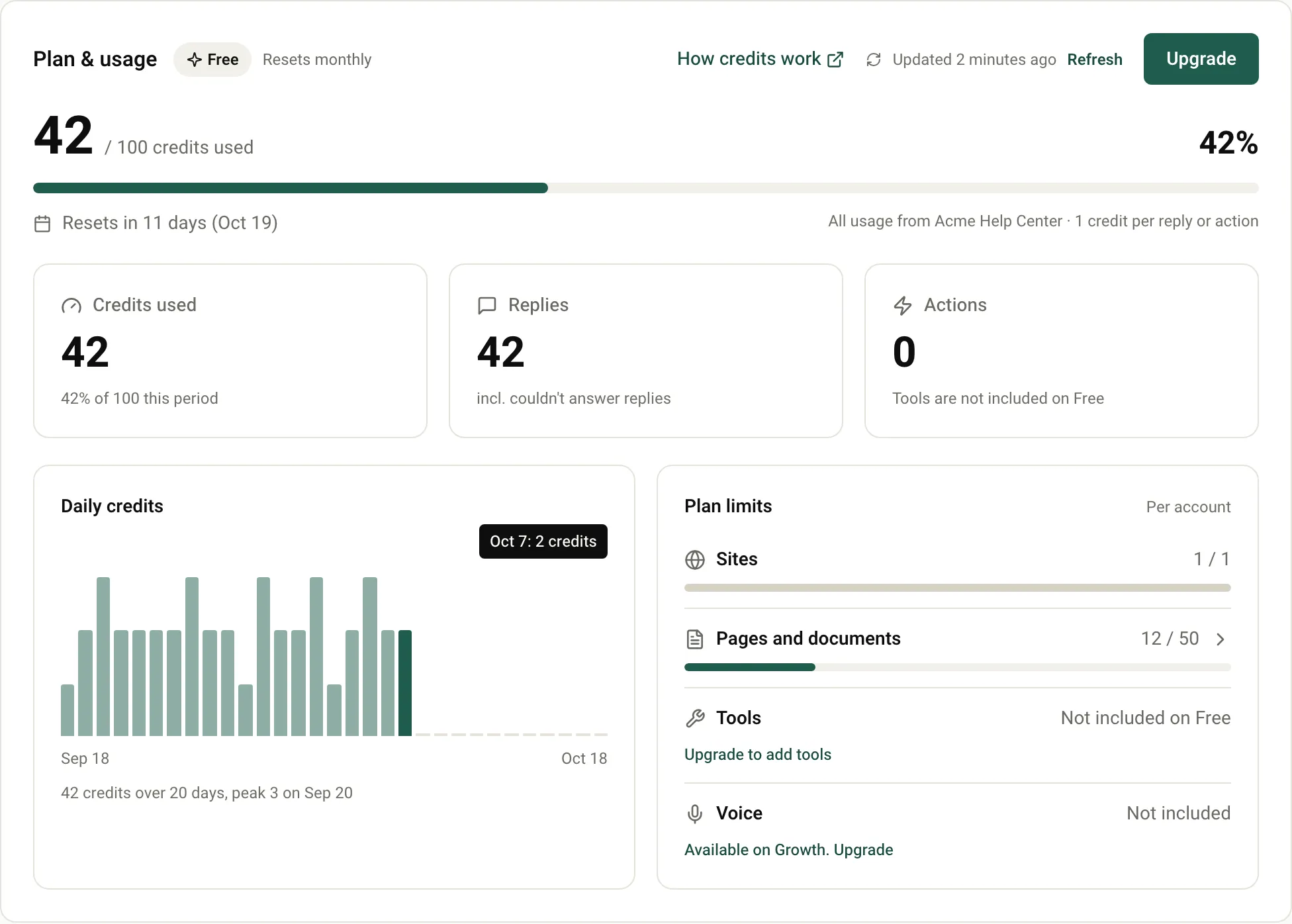
Section titled “Check your usage”Select Dashboard in the sidebar. The Plan & usage section shows:
- Credits used out of your monthly credits, as a number and a percentage, with Resets in N days and the date.
- Replies and Actions: how your credits were used this period.
- Daily credits: a chart of credits used each day this period.
- Plan limits: your sites, pages and documents, tools and voice against what your plan includes.
- Usage by site: each site’s share of the pool, if you have more than one site.
Select Refresh to update the numbers. The sidebar also shows your usage percentage at all times.
At 80%
Section titled “At 80%”When you’ve used 80% of your credits, the dashboard shows a warning, for example: “You’ve used 80% of your credits. AgentMySite pauses at 100% until Oct 18.”
At 100%: the assistant pauses
Section titled “At 100%: the assistant pauses”When you’ve used all your credits for the period, the assistant on all your sites pauses.
What your visitors see. When a visitor sends a new message, the assistant doesn’t answer it. Instead, the widget shows this notice:
This assistant is unavailable right now. Please try again later or contact us another way.
The message box is then disabled, with the placeholder Assistant unavailable and the hint The assistant is paused. Please try again later. If your site’s content language is Hebrew, visitors see these messages in Hebrew.
A reply that’s already in progress when you reach 100% always finishes. Paused messages don’t use credits.
What you see. The admin panel shows a banner, Your assistant is paused., with the date it resumes. The sidebar usage indicator shows Paused.
How the assistant resumes
Section titled “How the assistant resumes”- At your next reset date, your credits refill and the assistant starts answering again straight away. You don’t need to do anything.
- By upgrading, if you’re on the Free plan. See Change your plan.
Visitors who saw the paused notice can reload the page to chat again after the assistant resumes.
Prices are in US dollars per month. Annual billing gives you 2 months free.
| Free | Starter | Growth | Business | |
|---|---|---|---|---|
| Monthly price | $0 | $29 | $99 | $299 |
| Price per month, billed yearly | $0 | $24 | $82 | $249 |
| Credits per month | 100 | 1,500 | 5,000 | 15,000 |
| Sites | 1 | 1 | 3 | 10 |
| Pages and documents | 50 | 500 | 3,000 | 15,000 |
| Tools (AgentActions) | Not included | 5 | Unlimited | Unlimited |
| Tool audit log | No | No | No | Yes |
| Voice | No | No | Yes | Yes |
All sites in your account share one credit pool.
Change your plan
Section titled “Change your plan”-
On the Dashboard, select Upgrade in the Plan & usage section.
-
In Choose a plan, choose Monthly or Annual, then choose a plan.
-
Select Continue to payment.
Online payment is coming soon Coming soon . Until then, the plan picker asks you to contact support. Email support@agentmysite.com with the plan you want, and the team switches your account.
For the Business plan, select Talk to sales or email sales@agentmysite.com.
If you already have an active paid plan, contact support to change it.
Next steps
Section titled “Next steps”- Keep content fresh so each credit buys a good answer.
- Troubleshooting
Was this page helpful?
Thanks for the feedback.