Core concepts
This page explains the terms you meet across the admin panel and these docs.
Account
Section titled “Account”Your account is the email address you sign in with. AgentMySite uses one-time codes instead of passwords. Your plan and your credits belong to the account, not to a single site.
A site is one assistant with its own content, appearance, conversations and embed snippet. You create your first site when you sign up.
Each site has a site key, a public identifier that starts with ed_. The key is part of your embed snippet. It’s safe to put in your page’s HTML because the widget only starts on your allowed domains.
Plans differ in how many sites they include. See Credits and billing. The admin panel sets up your first site when you sign up.
Allowed domains
Section titled “Allowed domains”Allowed domains are the hostnames the widget may run on, such as www.acme.com. When the widget starts, AgentMySite checks the hostname of the page it runs on. If the hostname isn’t in your list, the widget doesn’t appear.
- Enter hostnames only. Schemes (
https://), paths, ports and wildcards (*.acme.com) aren’t accepted. - Ports are ignored when the check runs, so
localhostcovershttp://localhost:3000and any other port. www.acme.comandacme.comare different hostnames. Add each one your site uses.
You manage the list in Site Settings > Allowed domains.
Content
Section titled “Content”Content is what the assistant answers from. You can:
- Upload documents: PDF, DOCX, Markdown (
.md) and plain text (.txt) files up to 100 MB each. - Add web pages: one page at a time by URL, or many pages at once from your sitemap.
AgentMySite splits each item into short passages called chunks and indexes them for search. An item moves through these statuses: Queued, Processing, then Ready or Failed. Only Ready content is used in answers.
Grounded answers
Section titled “Grounded answers”When a visitor asks a question, the assistant searches your site’s content for the most relevant chunks and writes an answer from them. If nothing relevant is found, it replies honestly that it can’t help with that question, and the question appears on the Unanswered page. It doesn’t make up an answer.
Visitors can ask in their own language. The assistant searches your content and replies in the visitor’s language.
Widget
Section titled “Widget”The widget is the chat window on your site. It’s made of a small loader script, which you paste as the embed snippet, and a chat window that opens in a secure frame. Its name, colours and welcome text come from your Appearance settings each time it starts, so you never need to change the snippet to restyle it.
Credits
Section titled “Credits”Credits measure usage. Each AI reply your visitors receive uses 1 credit. Each action the assistant takes adds 1 credit. All sites in your account share one monthly pool. When the pool is used up, the assistant pauses until the next period. See Credits and billing.
Conversations
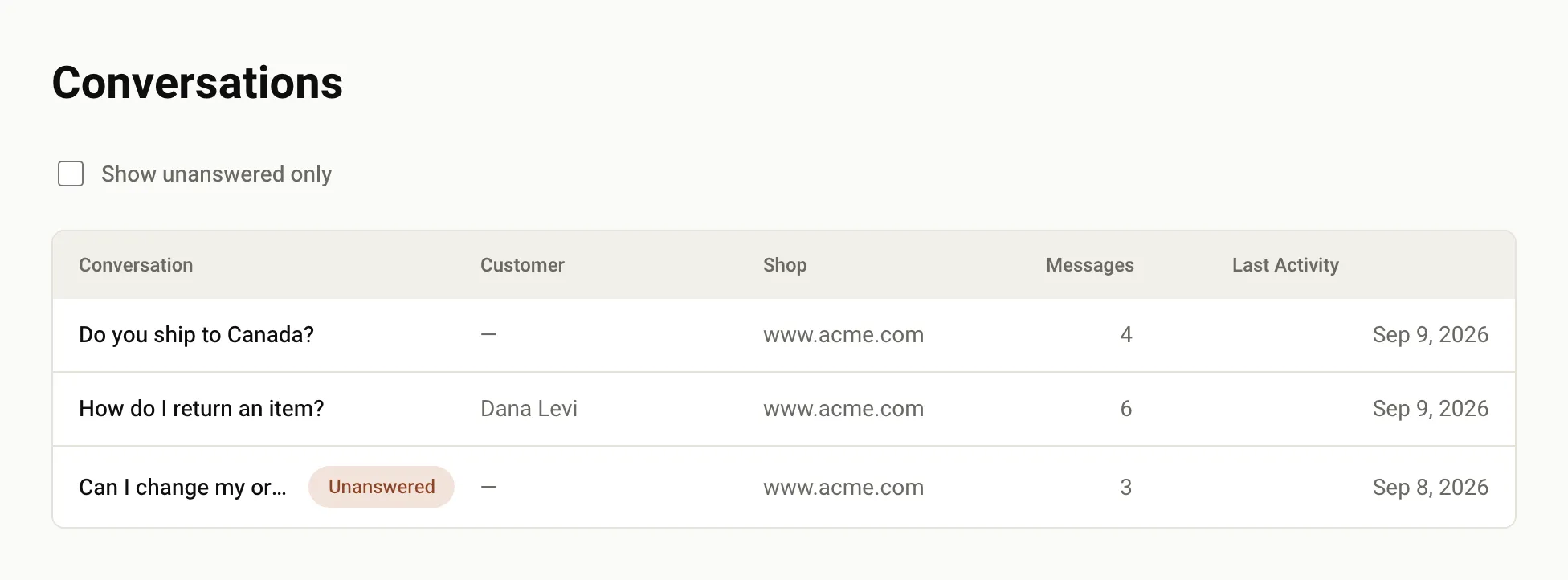
Section titled “Conversations”A conversation is one visitor’s chat with the assistant. You can read every conversation in Conversations, including the sources each answer used. Turn on Show unanswered only to find questions the assistant couldn’t answer.
Support handoff
Section titled “Support handoff”If you connect a helpdesk on the Integrations page, the assistant can offer to pass a visitor to your team when it can’t help. It creates a ticket in your helpdesk and shows the visitor its status. Clokio is the helpdesk available today. See Integrations.
AgentActions
Section titled “AgentActions”AgentActions, or tools, let the assistant do things on your site, such as look up an order. You define them on the Tools page and handle them in your site’s code. They’re available on paid plans. See AgentActions.
Was this page helpful?
Thanks for the feedback.